Features Available In Pippily
Announcing the upcoming release of Pippily in April 2026, inviting early adopters to provide valuable feedback as we refine our outstanding Commerce First platform for Chambers of Commerce and community leaders.
THIS PLATFORM PRIORITIZES COMMERCE, CATERING TO COMMUNITY BUSINESS SUBSCRIPTIONS AND PROVIDING SOLUTIONS THAT EMPOWER EVERY BUSINESS TO EXPAND THEIR REACH AND GENERATE PROSPECTS.
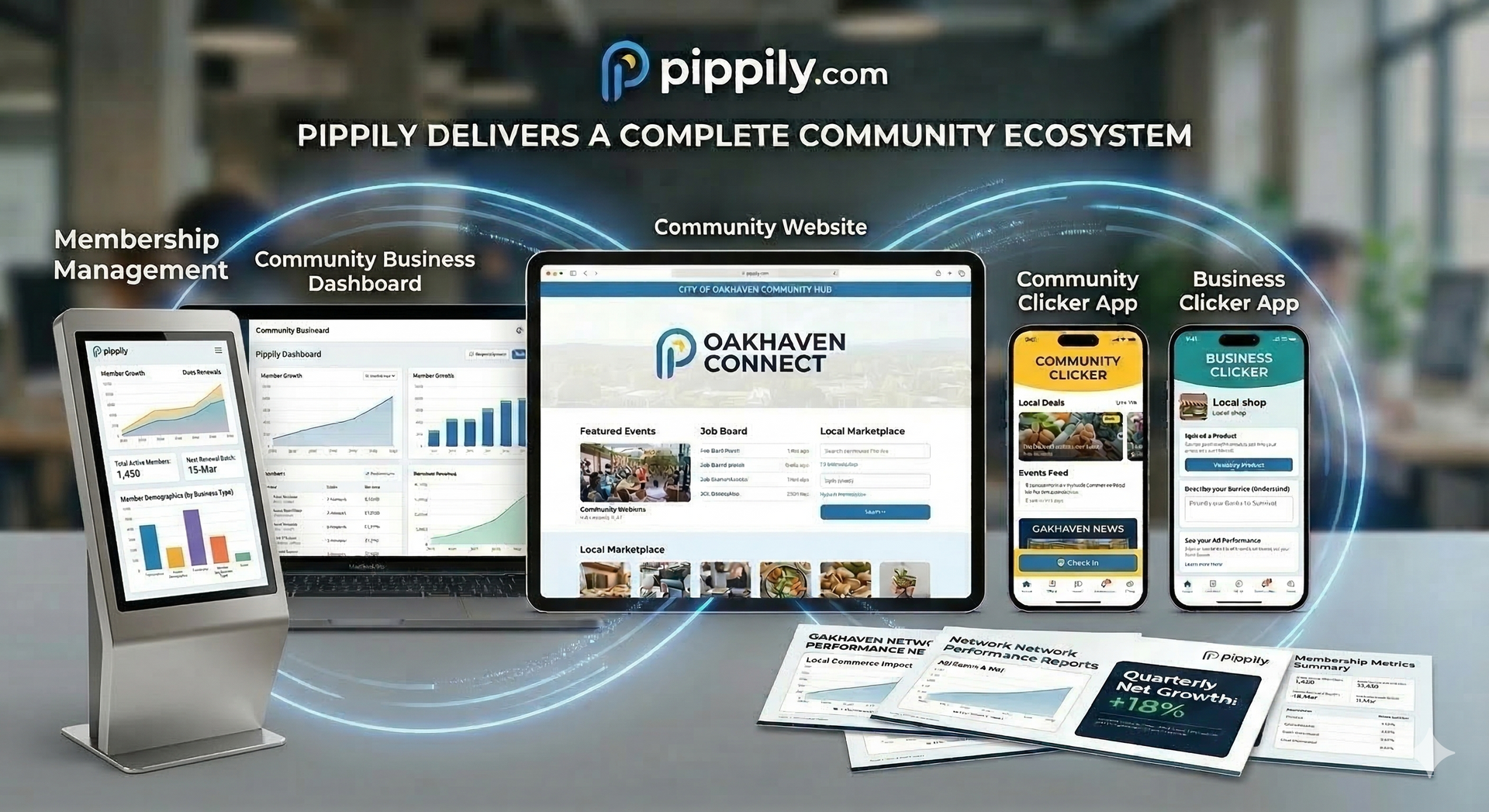
Pippily is a commerce-first ecosystem designed to promote every business in your community while providing a robust, streamlined database and payment system. For organizations that require complex, enterprise-level database features, we offer seamless integration with the Chamber Nation platform. However, if your mission is to drive local commerce through an AI-powered hub—complete with integrated event registration, the security of Stripe payments, and the marketing power of Constant Contact—Pippily is your ideal solution. We don't just provide a tool; we provide a result. Our concierge team onboards and connects every business to ensure they look incredible and achieve maximum visibility within the local network.
The Pippily Feature Map (Admin Edition)
1. High-Level Command & Control (Dashboard)
Located on the Home Screen for daily oversight.
- Economic Impact Tracker: Real-time Search Exposures and service or Item Clicks trends.
- Revenue Snapshot: Successful payments and total transaction volume from members.
- Growth Monitor: New member sign-ups over a 30, 60, or 90-day period.
- System Alerts: News, updates, and support ticket access from the "Chamber Nation" mother-ship or now through Pippily when it is in Admin Edition mode.
- Mobile Quick-Link: Permanent QR code to download and view the community via the Community Clicker app.
2. Community Branding & Public UI
Located under Community Settings > Community Hub.
- Welcome Center Profile: Manage the "About Us" text, physical address, and official website URL.
- Visual Editor (Look & Feel): Upload header images, set background YouTube videos, and define Accent Colors.
- Custom Navigation: Create Custom Links & Labels to redirect users to Facebook, Google, or external videos.
- Hub Homepage Settings: Edit the primary Welcome Text and Tagline for the community portal.
- Badge System: Create and manage "Trust Badges" (Organization Badges) that appear on member profiles.
3. Community Directory & Marketplace Management
Located under Businesses & Community Settings.
- Category Architect: Build a hierarchy of Parent and Sub-Categories for a searchable marketplace.
- The Master List: A searchable database of all businesses with filters for Kiosk and Mobile App status.
- Admin View (Valet Support): The ability to "impersonate" a member to edit their profile on their behalf.
- Micro CRM: A private internal notepad to track staff interactions with specific businesses.
- Member Status Toggles: Instantly enable/disable a member's visibility in the directory or mobile app.
Continued...
4. Member-Level Growth Tools
Located within the individual Member Dashboard (Admin View).
- Advertising Report (ROI): A shareable document showing "Total Ad Value" in dollars and actual click data.
- Digital Catalog: Tools for members to add Products, Services, and Offers.
- Multimedia Tools: Integrated Profile Video recorder and Business Logo uploader.
- Pippily.Ai / Instant Ad Writer: AI-powered tools to generate business descriptions and marketing copy.
- Reputation Manager: A module to enable/disable Ratings & Reviews and may be extended with their own Google Reviews by entering their Place ID.
- Custom Pages: Ability to build dedicated landing pages (sub-pages) within a member's profile for additional advertising outreach.
5. Billing & Revenue Automation
Located under the Billing Menu.
- Membership Plan Creator: Define tiers (Starter, Advanced, etc.) and set automated renewal pricing.
- Stripe Connect: One-click synchronization to provision legacy members for recurring credit card billing.
- Payment History: A searchable audit trail of all transactions, including failed payments and Stripe IDs.
- Manual Billing Invites: A specific tool to send email invitations to businesses not currently on an automated plan.
6. Communications & Outreach
Located under the Communications Menu.
- Constant Contact Sync: Automated list management for "Active" vs "Inactive" members.
- Template Builder: A drag-and-drop editor for newsletters and community announcements right inside of Pippily.
- Campaign Wizard: A 3-step workflow to draft, target, and send mass emails.
- Smart Merge Tags: Personalization codes ([[FIRSTNAME]], [[COMPANYNAME]]) to increase email engagement.
- Sponsorship Engine: Manage logos that appear in the Community Clicker App, the Community Hub, and the Instant Ad Writer emails.
7. Strategic Endpoints (Kiosks & Links)
Located under Integrations & System Links.
- Kiosk Network: Unique URLs to turn any tablet into a Tourist or Community Digital Kiosk.
- System Links Library: A "Cheat Sheet" of all public URLs (Welcome Center, Stats page, Kiosk links).
- Public Integration Links: Specific URLs for members to embed their Pippily Catalog, Job Board, or Review Form into their own external websites.
- CNAME: Custom URL Support (optional)
AMAZING COMMUNITY WEBSITE FUNCTIONALITY
1. Core Interface & Design Panels
- Top Navigation Bar: Toggle between pages, preview across device breakpoints (Desktop, Tablet, Mobile), access developer tools, and manage the Publish workflow.
- Side Design Panel: The primary hub for site construction:
- Widget Library: Drag-and-drop elements including text, images, buttons, and advanced icons.
- Page Manager: Control site architecture, nested navigation, popups, and page-level SEO.
- Global Theme Engine: Define universal styles for typography (H1–H6), color palettes, and site-wide spacing.
- Unified Content Library: A centralized database for business information (NAP) and media that syncs across all site elements.
- Layers Navigation: A hierarchical tree view to select and organize specific containers, rows, and overlapping elements.
2. Layout & Responsive Infrastructure
- Flex & Grid Systems: Advanced tools for building pixel-perfect layouts using modern CSS Grid and Flexbox architecture without manual coding.
- Visual Drag-and-Drop Canvas: The primary interface for real-time element placement and design.
- Device-Specific Editing: Specialized tools to hide, show, or restyle elements specifically for mobile or tablet viewers.
- Section Copy/Paste: High-speed building by moving entire designed sections between different pages or projects.
- Advanced Developer Mode: Direct access to the underlying HTML and CSS for custom code injections when needed.
3. AI-Powered Automation Stack
- AI Content Assistant: Instantly generates marketing copy, adjusts brand voice, or translates content within the editor.
- AI Layout Builder: Generates entire page structures or functional sections from a simple text prompt.
- AI SEO Automation: Batch-generates Meta Titles, Descriptions, and Image Alt-Text across the entire domain.
- AI Custom Widget Creator: Build unique functional components by describing them in plain English; the system handles the script generation automatically.
4. High-Conversion Business Widgets
- Membership Gating: Create protected areas for exclusive content requiring user authentication.
- Dynamic Blog Engine: A robust platform for content marketing with RSS support and scheduled posting.
- Personalization Engine: Trigger unique site experiences (like custom popups) based on visitor behavior, time, or location.
5. Collaboration & Performance Management
- On-Site Client Comments: A collaborative feedback system allowing users to pin comments directly onto the staging site for review.
- SEO & Analytics Dashboard: Manage schema markup and sitemaps while monitoring Core Web Vitals for top-tier performance.